From Pieces to One Image: How I Combine Photoshop, ChatGPT, and Judgement
Nov 12, 2025I picked the images myself. That matters because this was not about fixing a bad selection. It was about working with material that had a purpose, but was never meant to live in the same frame. Each photo had something I wanted. A look, a pose, a moment. I knew from the start that the work would not be about effects. It would be about control.
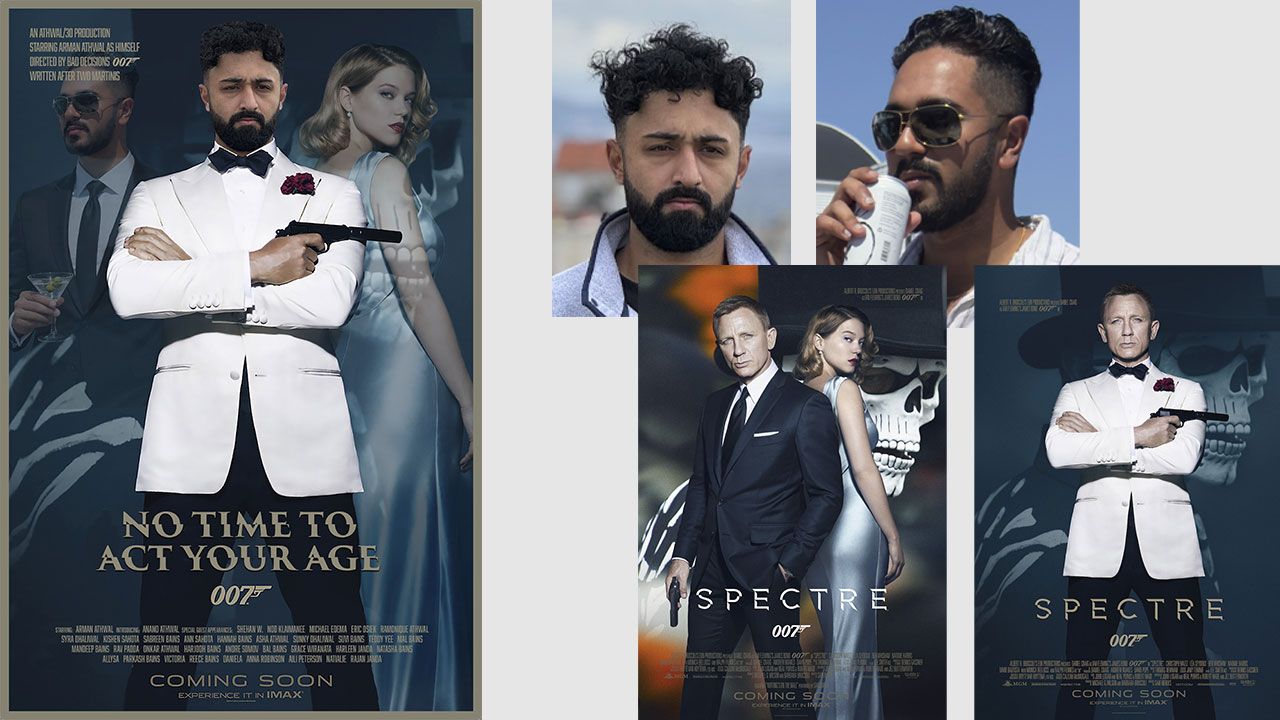
This project was created as a custom poster for a 30th-birthday Bond-themed party. The goal was not to imitate a movie poster, but to create something personal that felt confident, clean, and believable. The image needed to work as a gift, a statement piece, and a visual anchor for the event, which meant every detail had to feel intentional rather than styled for effect.
This is how most real Photoshop projects begin.
You do not get one perfect image. You get pieces. Your job is to decide what each piece is responsible for and what it is not allowed to do. I already knew what the final image needed to feel like. Calm confidence. Clean presence. Nothing loud. Nothing accidental. Once that is clear, Photoshop becomes a tool, not a crutch.
The first step was properly isolating the subject. Not quickly. Not with shortcuts. Clean selections are not glamorous, but they are the foundation. If edges are sloppy, everything else feels fake, even if the viewer cannot explain why.
From there, posture mattered more than people realize. Small shifts change how a person is read. If the stance feels unsure, the image never recovers. This is not about exaggeration. It is about making sure the body language matches the intent.
Lighting is where most of the time went. Each photo had its own lighting logic, so I had to choose one and make everything else conform to it. I was not trying to make the lighting dramatic. I wanted to make it consistent. Shadows needed to fall where they should — highlights required to make sense. If light breaks the rules, the brain notices immediately.
Colour correction followed the same thinking. No presets. No looks. Just balance. Skin tones needed to feel natural. Whites needed to stay quiet. Blacks needed detail. When colour is right, nobody comments on it. That is exactly the point.
This is where Photoshop and ChatGPT work together practically.
Photoshop gives me full control over the image. ChatGPT helps with specific problems in that process. In this case, the guy was holding a can that didn't belong in the final poster. ChatGPT removed the can and generated what was realistically hidden behind it, including parts of the hand. From there, I took over in Photoshop to refine shape, lighting, texture, and proportion so it actually belonged. Neither replaces experience. Experience is what tells you whether the result feels natural or whether you are just decorating pixels.
More often than not, that process leads to removal. Something goes away. A background element. A contrast push. A detail that does not earn its place. Good compositing is mostly about knowing what to leave out.
The final stage is refinement. Edges get softened where needed. Texture gets evened out. Contrast gets tightened just enough. These are small moves, but they add up. The image starts to settle. When nothing jumps out, and nothing feels strained, I stop.
The finished poster looks simple. That is intentional. When you put it next to the source images, you can see how much alignment was needed to get there. Different photos. One result. No visual arguments left.
That is the part people miss. The software is not the skill. The judgment is.
___
If you need Photoshop work that relies on judgement, not shortcuts, you can contact me directly to discuss your project.