Why a Well-Designed 404 Page is Crucial for Your Website and SEO
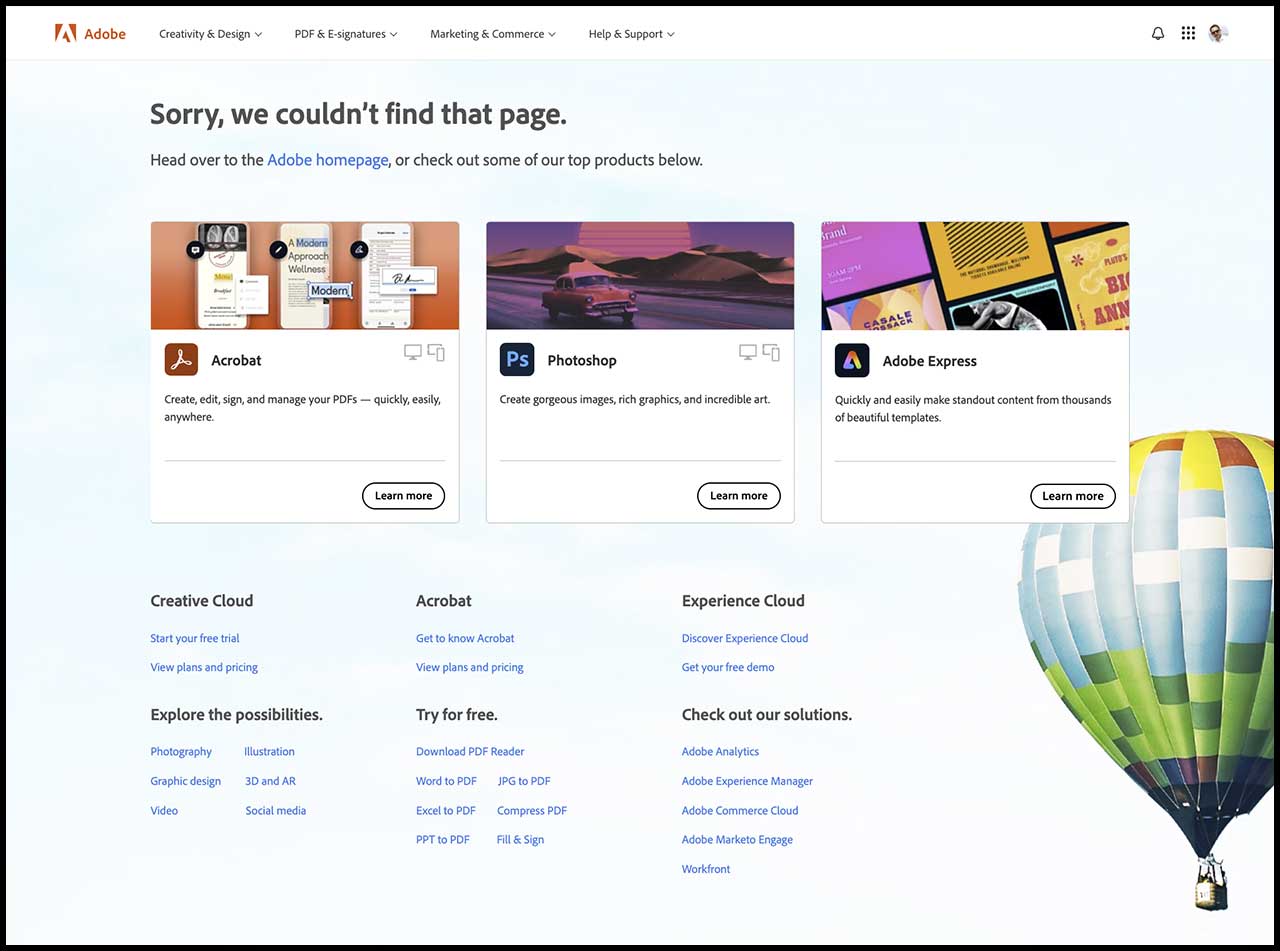
Sep 23, 2024The image above shows Adobe's 404 page, which gives visitors plenty of ways to find what they were looking for.
A 404 page is what visitors see when they try to open a page that doesn't exist on your site. The name comes from the HTTP 404 status code, which a server sends when it can't find the page requested. It usually happens because of a broken link, a page that's been deleted or moved, or a mistyped address.
It's easy to treat this as a technical detail, but it affects how people experience your site. A bare "Page not found" message is a dead end. A well-designed 404 page helps people get back on track, and can even reinforce your brand.
Why a custom 404 page matters
It keeps people on your site
A generic error page with no navigation gives people nothing to do except leave. A good 404 page offers a way forward: a link to your homepage, links to your most popular pages and, ideally, a search box. The easier it is to find something useful, the more likely visitors are to stay rather than going back to the search results and clicking a competitor.
It reflects your brand
Your 404 page is an easy place to show some personality. Using your own colours, fonts and tone of voice makes even an error feel like part of your site. Many brands add a bit of humour or a playful illustration, which can turn a frustrating moment into a memorable one, as long as the way forward is still obvious.
How 404 pages relate to SEO
Having some 404 errors won't hurt your search rankings by itself. Google expects sites to have pages that no longer exist, and a 404 is the correct response for them. Where SEO comes in is in how you manage broken links and what visitors do next.
Keeping visitors engaged
If people hit a dead end and leave straight away, you lose them. A helpful 404 page gives them a reason to keep exploring, which is good for your business whatever its effect on search.
Finding and fixing broken links
Broken links frustrate visitors and waste the attention of search engine crawlers. Google Search Console shows which URLs on your site are returning 404 errors. When a page has moved, set up a 301 redirect to its new address so visitors and search engines end up in the right place. Keep the 404 page for addresses that really don't exist anymore.
Making sure it returns a real 404
One technical point: your custom 404 page should still send a proper 404 status code. If it returns a normal "200 OK" status instead, search engines can treat it as a real page, which Google calls a "soft 404". Most platforms, including Kajabi and WordPress, handle this correctly, but it's worth checking if your site has been heavily customised.
Linking to your best content
Adding links to your key pages, popular posts or product categories gives visitors useful places to go and helps them discover parts of your site they might not have found otherwise.
Turning a dead end into an opportunity
A 404 page can do more than recover lost visitors. You can use it to point people to a current offer, a free download or your newsletter sign-up. Keep it helpful first, though. Someone who's just hit an error wants to find their way, so the main options should still be about getting them where they meant to go.
What to include
- a short, friendly message explaining that the page can't be found
- a clear link back to your homepage
- a search box, if your site has one
- links to your most popular or most useful pages
- your normal site header and footer, so people can navigate as usual
Bringing it together
A well-designed 404 page takes little effort and makes a real difference. It helps visitors who've hit a dead end find their way, shows a bit of your brand's personality and gives you a chance to point people to your best content. Pair it with regular checks for broken links, and most visitors will never need to see it at all.